Xinghui1.3.7
Beijing Yanxuan Technology Co.
August 30, 2025
205 MB
1.3.7
Android 5
Description
Xinghui AI Avatar Generator: Transforming Your Selfies Into Digital Art
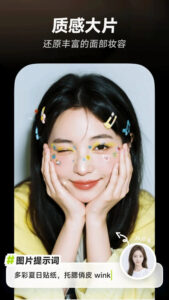
Xinghui APK is an AI-powered photo editing app designed to create personalized avatars, turn selfies into digital art, and even make short videos from still photos. If you’ve ever looked at a boring ID picture and wondered, “What if I could look like a cyberpunk hero or a jungle explorer with no Photoshop skills?” this app is built for that curiosity. Xinghui brings excitement to photo editing, letting users turn simple snapshots into fun, imaginative visuals perfect for social media or sharing with friends. With easy tools for playful self-expression, it stands out among Android photo editors, especially when basic editors start feeling dull.
The app uses AI to scan a person’s face, allowing users to customize their digital identity with outfits, backgrounds, and even text-to-image prompts. Outputs go far beyond normal retouching expect detailed avatars and creative environments that mix realism with imagination. When I asked Xinghui to turn my selfie into a heroic knight, it gave me more of a “quirky squire,” but honestly, that’s part of the fun.
Xinghui produces high-resolution images, supports short video generation, and offers generous free trials before asking you to pay. With a large template library, powerful filters, and support for many artistic styles, this app makes digital art accessible to everyone.
Standout AI Avatar and Digital Art Features
AI-Driven Avatar Creation
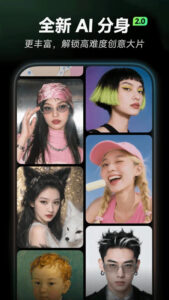
Xinghui works mainly as an AI avatar generator. You upload a selfie, and the system instantly begins transforming it. The AI analyzes facial features so avatars look natural instead of robotic. The tool supports many types of outcomes:
- Personalized digital selves: Turn yourself into a cartoon, fantasy character, or professional-style avatar.
- Outfit swap: Try on everything from modern fashion to historical costumes.
- Environmental changes: Place yourself in futuristic cities, jungles, forests, and more.
Seeing your face placed into fun, unusual settings is a big part of the experience. The AI-generated avatars help users explore different versions of themselves, almost like starring in their own story. Trying on wild hats and dramatic backgrounds quickly becomes addictive.
Artistic Style Transformations
Xinghui also excels at turning normal photos into stylized digital art. Instead of just adding filters, it changes the entire mood and look of the picture using different styles:
- Pixel art: Transform photos into retro game-like images.
- Cyberpunk: Add neon lights, tech details, and futuristic city scenes.
- Artistic presets: Choose manga, watercolor, oil painting, and more.
These styles create sharp, high-quality results, but they’re also entertaining. A friend who aimed for a “Renaissance queen” ended up looking more like a “very confused monarch,” but the surprises make the app more enjoyable.
Boost Creativity With Templates and Text-to-Image Tools
Template-Based Customization
Templates make it easy for anyone to create avatars quickly. You simply pick a look or background, and the app applies it automatically.
- Large library: Includes everything from business outfits to sci-fi armor.
- Fast selection: Tap a style, preview it, and save.
- Consistent results: Templates are designed to reduce strange AI glitches.
Templates lower the learning curve so beginners can make impressive images right away. I switched between “rock star,” “office manager,” and “action movie hero” styles in just minutes.
Prompt-Based Editing and Text-to-Image
For more creativity, the app lets you type prompts to describe what you want. The AI uses your words to build unique avatars or backgrounds.
- Text-to-image: Turn short descriptions into full digital scenes.
- Style layering: Combine keywords for detailed results.
- Creative freedom: Make unusual hybrids or personalized styles.
This feature takes practice. Sometimes the AI misunderstands complex prompts my request for a “medieval knight with robot arms” somehow produced robot chickens but experimenting is part of the fun.
Smooth Photo Editing and Video Creation
Photo Import and Export
Xinghui makes the process simple from start to finish:
- Easy import: Grab photos from your gallery or take a new selfie.
- Multi-format export: Images save as high-resolution JPEG files.
- Video generation: Turn still photos into short MP4 animations.
Importing and exporting rarely fails. Clear photos work best, but even low-quality pictures get creative transformations.
Interface and Navigation
Even with advanced AI features, the interface is clean and easy to follow. Icons guide the user, and you can find most tools without instructions.
The default language is Chinese, but the icons and layout make it understandable for international users. Prompt suggestions help you overcome language barriers. Plus, the app loads quickly, which keeps the creative flow going.
Realistic Rendering and Tips for Better Results
Image and Video Quality
Users praise Xinghui for its strong visual quality:
- Realistic rendering: Good lighting and facial expression handling.
- High resolution: Perfect for social media without pixelation.
- Smooth blending: Outfits and backgrounds usually fit naturally.
It isn’t perfect some strange artifacts may appear, especially with very complicated prompts. Video animations can sometimes look stiff or slightly unnatural.
Tips for Best Results
- Use well-lit, front-facing selfies for the most realistic avatars.
- Write clear, simple prompts to guide the AI.
- Reduce prompt complexity when making videos.
- Start with templates, then customize.
- If an image looks odd, try a clearer selfie or fewer keywords.
Finding the “prompt sweet spot” is key. Many of my best avatars came from just two or three keywords.
Freemium Features: Free vs. Paid
Xinghui uses a freemium system with a lot of free creative tools:
- You get many free attempts each day.
- Premium subscriptions offer unlimited creations.
- Advanced or batch editing is for paid users.
The free version is generous, so casual users can explore deeply before paying.
Ads and Limits
- Minimal ads that don’t interrupt the creative flow.
- Daily limits for free users, especially on videos.
- Fair design: Paid users get more volume, not special content.
Offline mode is limited to viewing creations. Photos are processed for editing only, following common privacy standards.
Who This App Is For
Xinghui appeals to many types of users:
- Social media fans who want unique profile pictures.
- Casual creatives who enjoy playful photo experiments.
- Hobbyists interested in AI-generated art.
- Kids and teens who love customizing avatars.
If you enjoy seeing yourself as a manga character, pixel hero, or cyberpunk adventurer, this app fits perfectly.
Things to Keep in Mind
- Use high-quality selfies for best results.
- Keep video prompts simple.
- Be patient with the Chinese-language interface.
- Older devices may heat up during video creation.
Uploading personal images is a personal choice, so be mindful. Professional artists may want more control, but for everyday creativity, Xinghui works great.
Why Xinghui Stands Out
Xinghui APK stands out among Android photo editors because of its AI-driven avatars, fun artistic transformations, and easy-to-use creative tools. It makes advanced editing simple for everyone. With smooth workflows, high-quality results, and generous free options, Xinghui welcomes both beginners and creative explorers.
If you want a fresh, unique look for social media or just enjoy playing with digital identity, Xinghui is definitely worth trying.
Images